Dell Technologies
Reimaginging Dell's support system that meets users where they are.
Case Study
10 minute read
— Contract Product Designer
TEAM
6 Product Designers
2 Internal Stakeholders
— Product Manager, Sr. Product Designer
TIMELINE
2025 -2026 (Aug - Jan)
SKILLS
Complex Systems
AI UX
Product Strategy
introduction
Overview
Over the fall 2025 semester, I worked with Dell to reimagine their online support experience, exploring how AI could unify fragmented entry points like search, chat, and self-help into a cohesive, guided resolution system that reduces user friction while preserving trust, transparency, and user control.
Dell Technologies’ mission is to enable people and organizations to transform how they work, live, and connect through reliable technology. Because Dell supports millions of users across a wide range of hardware and technical needs, the quality of its support experience is directly tied to user trust and long-term loyalty. With this in mind, the team approached us with the following question:
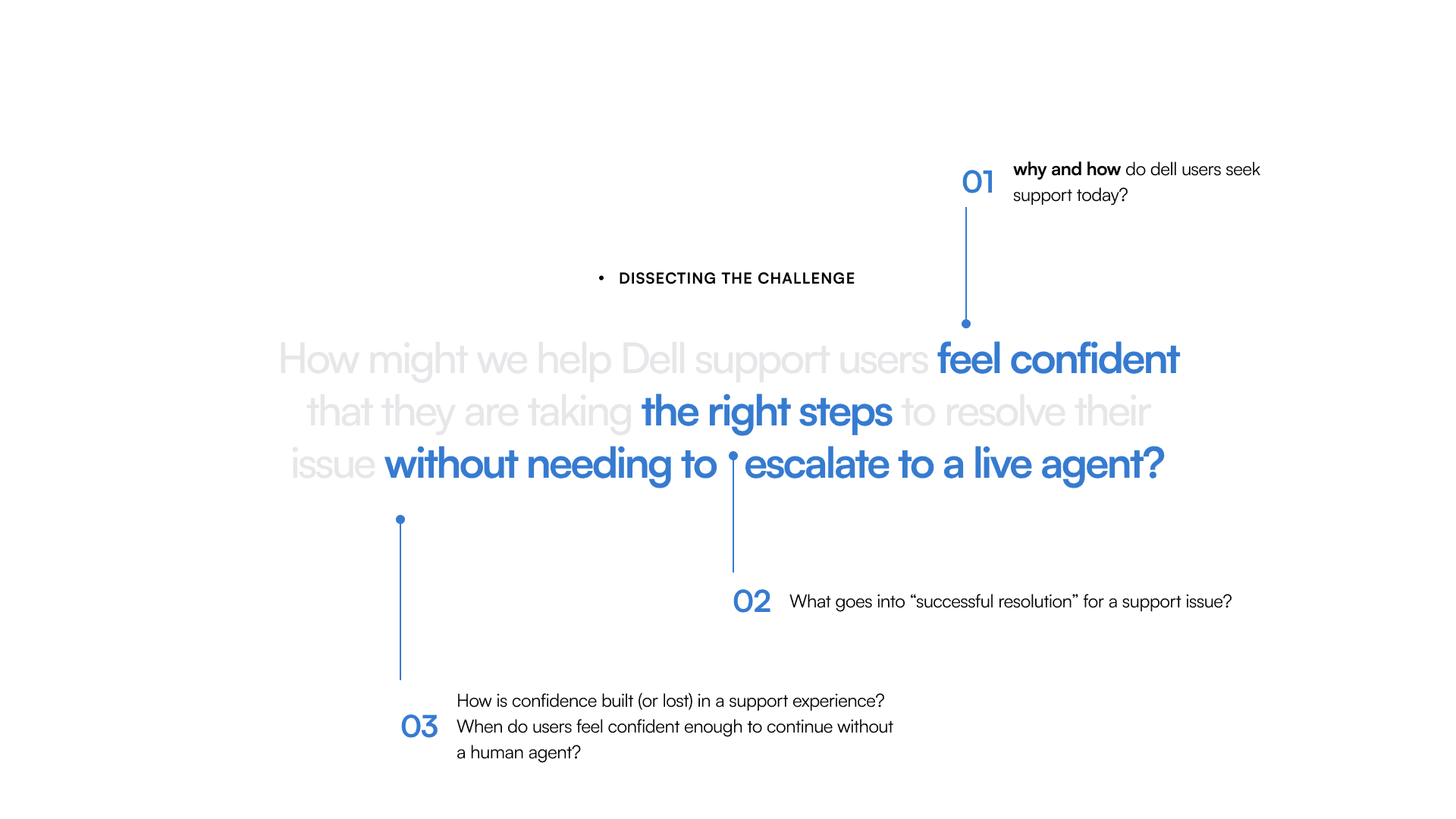
How might we help Dell support users feel confident that they are taking the right steps to resolve their issue without needing to escalate to a live agent?
preview
Dell AI Final Experience
home page
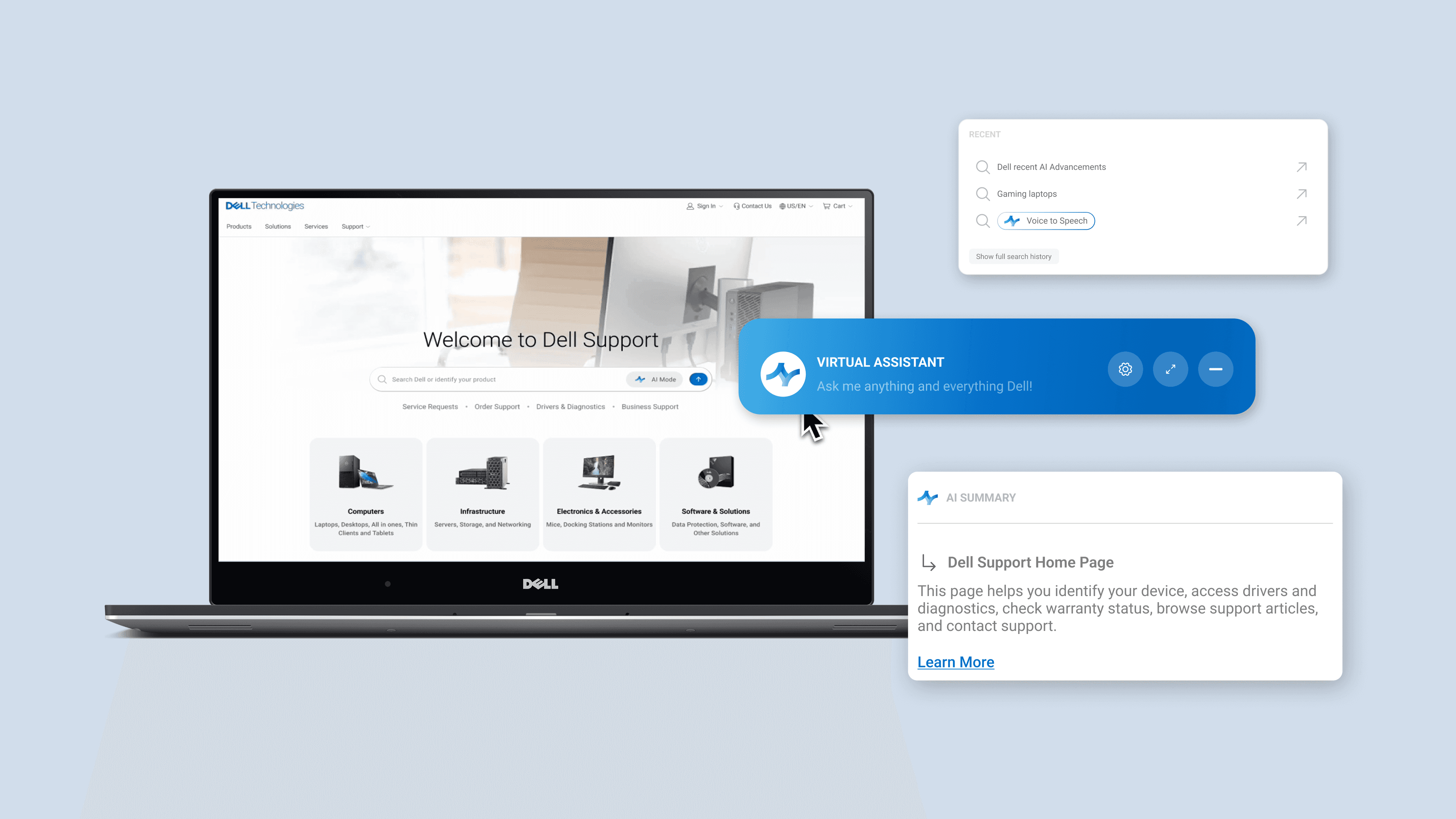
One place to start — no decisions required.
need assistance? Just ask
Dell AI

+ unified search bar
+ single entry point
+ direct AI integration


guided resolution
Step by step guidance that moves users forward.
An AI-led troubleshooting experience that breaks complex issues into clear, actionable steps with built-in diagnostics and next actions.
introduction
Understanding the project scope
First, I dissected the project scope into 3 high level insights that drove the direction of our research and design
introduction
Research Method Overview
To ground our design decisions, we began with a focused research phase to understand how users currently navigate Dell’s support ecosystem and where breakdowns occur. We believed these 3 method gave us the most insight into Dell's support system and how to translate this into design!
IA
Evaluated Dell’s information architecture to identify fragmentation and overlapping entry points.
Competitor Analysis
Exploring Dell and its market competitors to study how different hardware companies present their support system
User Interviews + Survey
Conducted interviews and surveys to identify support pain points and user behavior patterns.
research
Information Architecture
I began by walking through Dell’s current Support homepage as a user, tracing how someone navigates between search, chat, self-help, and live support.
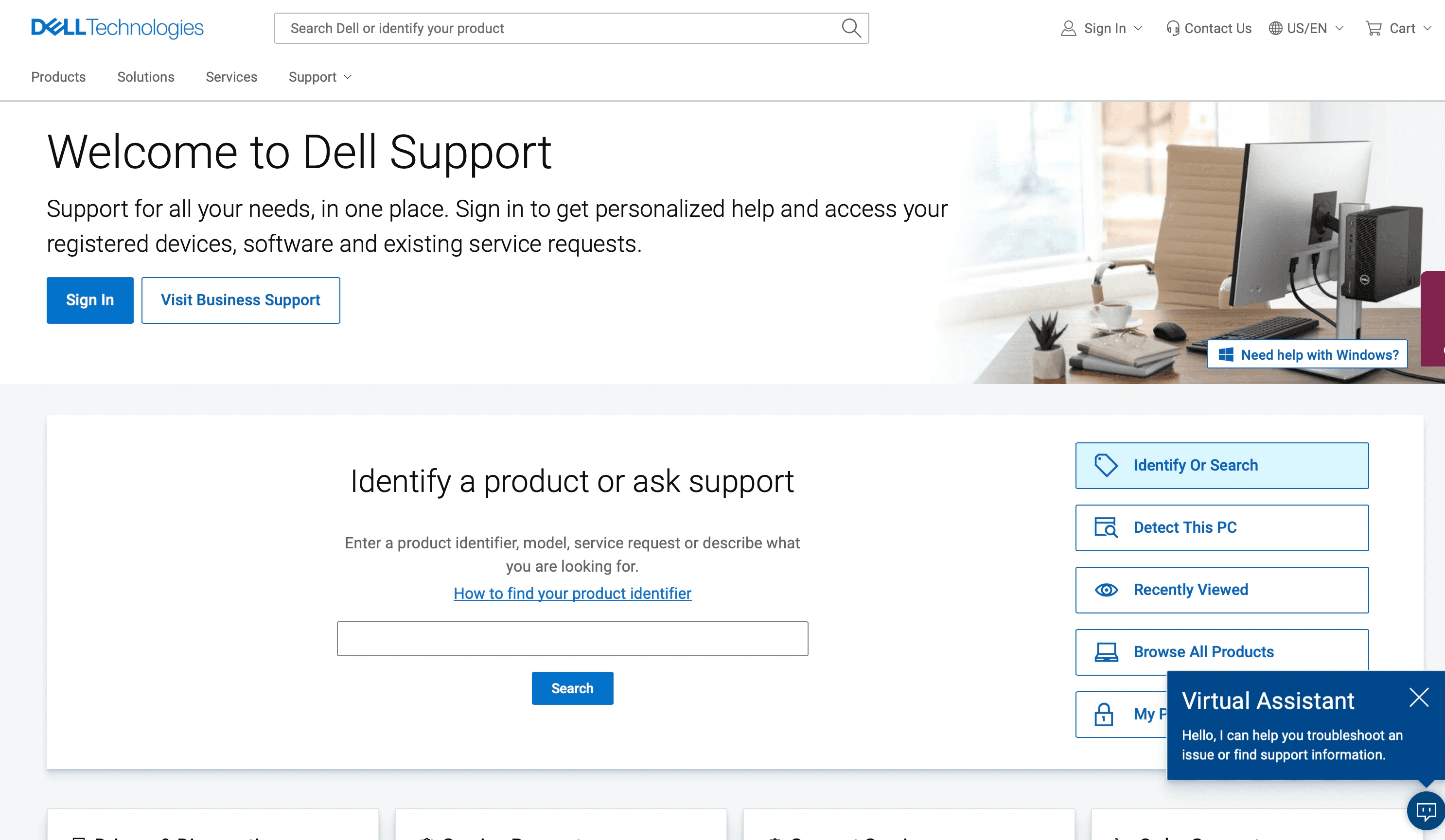
The IA map below captures that journey. It reveals how multiple entry points, overlapping features, and disconnected pathways can create confusion and force users to repeatedly reorient. This exercise helped clarify not just what exists, but how the structure itself shapes the support experience—and where it begins to break down.
buffer pages
action on page
floating features
action on new page
hidden action/ feature
to different form of media
research
CTA Mapping
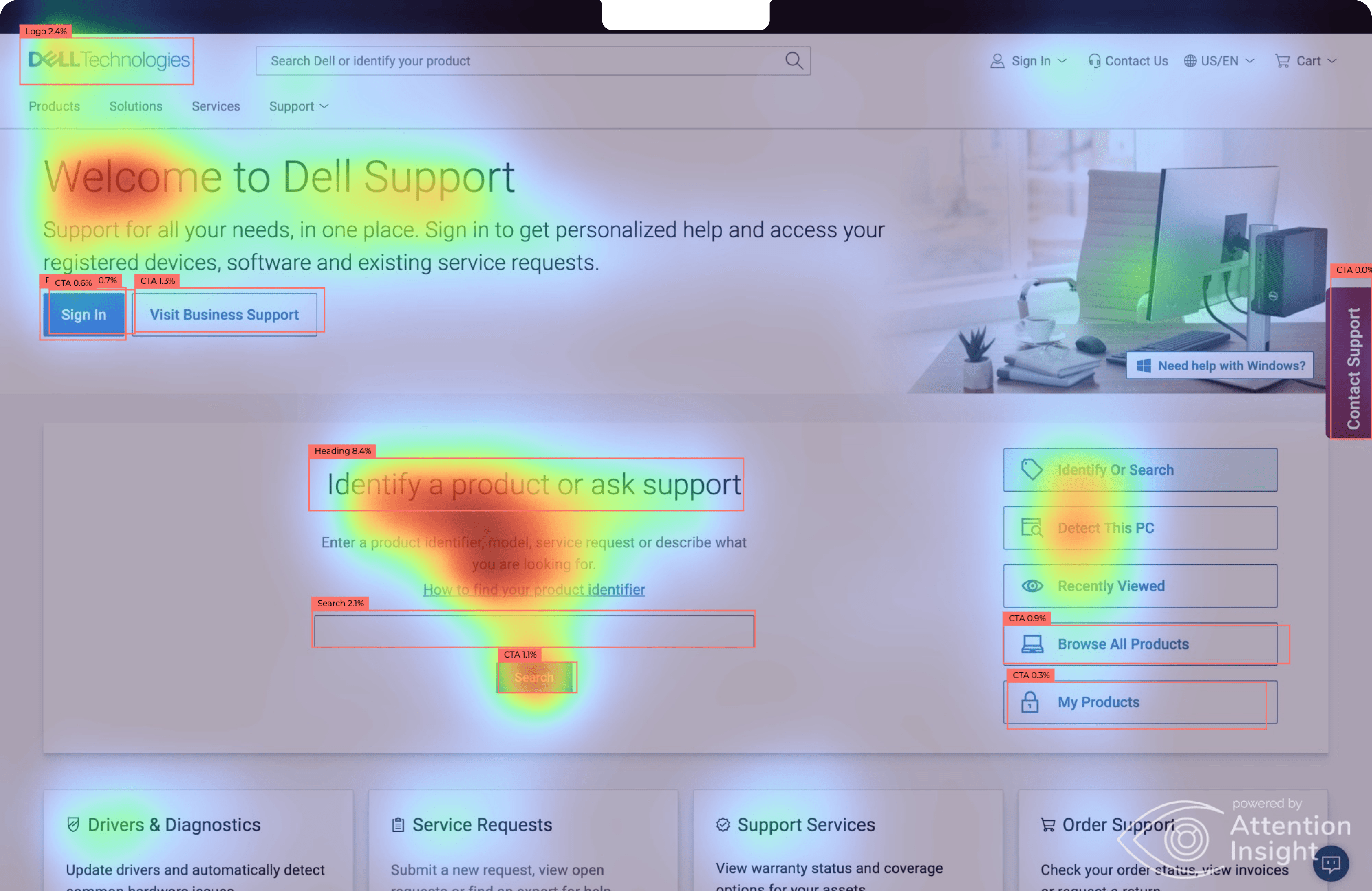
This structural walkthrough revealed where users hesitate—but I also wanted to understand why. To go deeper, we conducted a heat map analysis to examine how the information hierarchy and calls-to-action guide (or misguide) users at each decision point.
Clarity
57%
The heat map shows attention scattered across multiple elements, with no dominant focal point guiding the user’s eye. Combined with interview and survey findings, this suggests that users are not immediately sure where to start.
With several calls-to-action competing visually, the hierarchy becomes unclear, reducing confidence in the next step.
Focus
60%
the page distributes visual weight across search, chat, product lookup, and support links simultaneously. This split attention reinforces decision fatigue.
Without a strong visual anchor, users scan broadly instead of moving forward with purpose which contributes to hesitation and escalation.

research
User Interviews
Before evaluating specific features, I wanted to understand who Dell Support serves. Interview participants ranged in technical confidence—from users comfortable troubleshooting drivers and diagnostics to those who primarily rely on guided assistance. This range helped reveal how differently users interpret the same interface, and why a one-size-fits-all support structure creates friction.
Scenario 1
Understanding User Base
Scenario 2
User Interview Guide
Technology Usage
Experience with Dell
Demographics
Background
Technical Expertise
Virtual Assistant Experience
30
interviewees
Scenario 1
Navigating Battery Issues
Observe how easily users find troubleshooting resources
Identify whether users prefer FAQs, forums, or driver downloads.
Assess emotional tone
Support Page
Scenario 2
Navigating Wifi Issues
Evaluate helpfulness of the chatbot.
Understand comfort with automated support.
Identify points where users switch to wanting human help.
Virtual Assistant
These scenarios allowed us to observe natural behaviors; where users hesitated, what they ignored, and when they chose to escalate.
research
Survey Data
While these interviews provided deep, nuanced stories of friction, we needed to know if these experiences were shared by the broader Dell community. To complement these qualitative insights, we surveyed over 200 respondents to understand how the support ecosystem is perceived at scale.
Virtual Assistant
60.6%
felt chatbots give generic or unhelpful answers
40.8%
felt the bots simply didn't understand their specific issue
Usability paradox
½
of surveyed users agreed the layout was intuitive
💡 yet roughly 1/2 remained neutral or unconvinced that they could actually resolve their issue using the page
entry points
25.4%
of users go to the official support website first
57.7%
turn to external platforms


"I can find a thread of 50 people who had the exact same issue on Reddit. The official site and chatbot feels like a maze. "
Data Engineer @ Capital One
Technical User
No Dell Experience
"I tried the chatbot, but it just felt like a dead end … I just needed to know which button to click."
Student @ UC Irvine
Non Technical User
No Dell Experience
insights
Visual Support Journey
To understand the emotional cost of our research, we mapped the end-to-end support journey, tracking the shift from initial optimism to eventual friction across our two primary user segments.
💡 The journey concludes in a "break in technical experience" where the outcomes diverge sharply based on user background
insights
Research -> Ideation
Rather than jumping directly into solutions, we first distilled our research into actionable design tensions. By clustering insights across methods, we identified clear opportunity areas that would guide the system’s evolution.
Solution
As we transition into design assets, I wanted to keep a question in mind :
Given these fragmented user pathways and unclear entry points, how might we design a support experience that guides users to the right solution without forcing them to choose where to start?
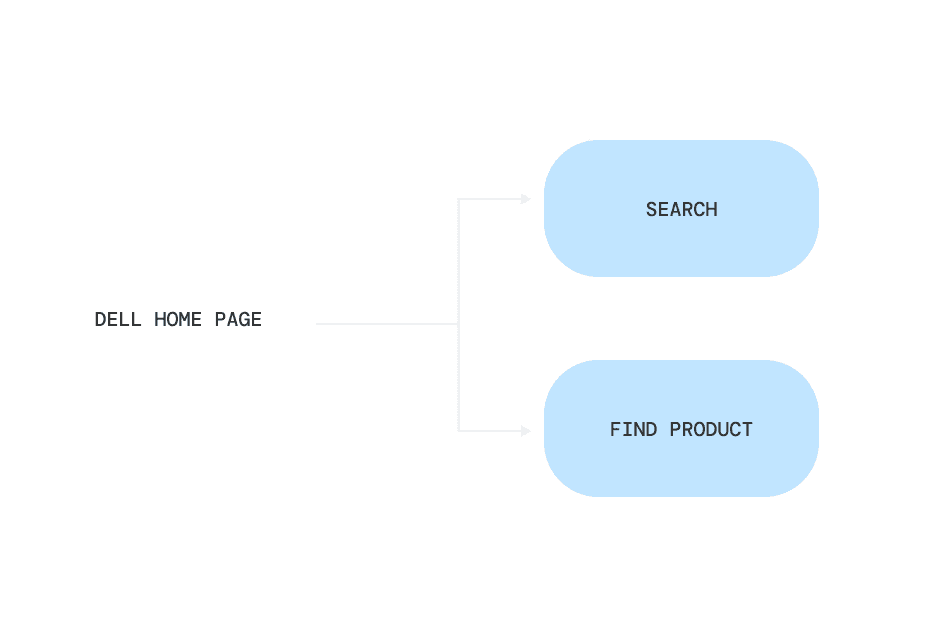
Simplified IA Path
"How do I fix this problem? Where are my first steps?"
We shifted from multiple parallel options to a guided hierarchy:
Search — for users ready to describe their issue
Find Product — for users who need contextual grounding first
Iteration 01
When testing how this would look visually, we began with this first iteration.
When expanded, this module revealed additional AI-related elements, including chatbot access and recent activity. The design relied on clear component hierarchy: a persistent primary search field, paired with a collapsible secondary container that housed supporting features without competing for visual priority.

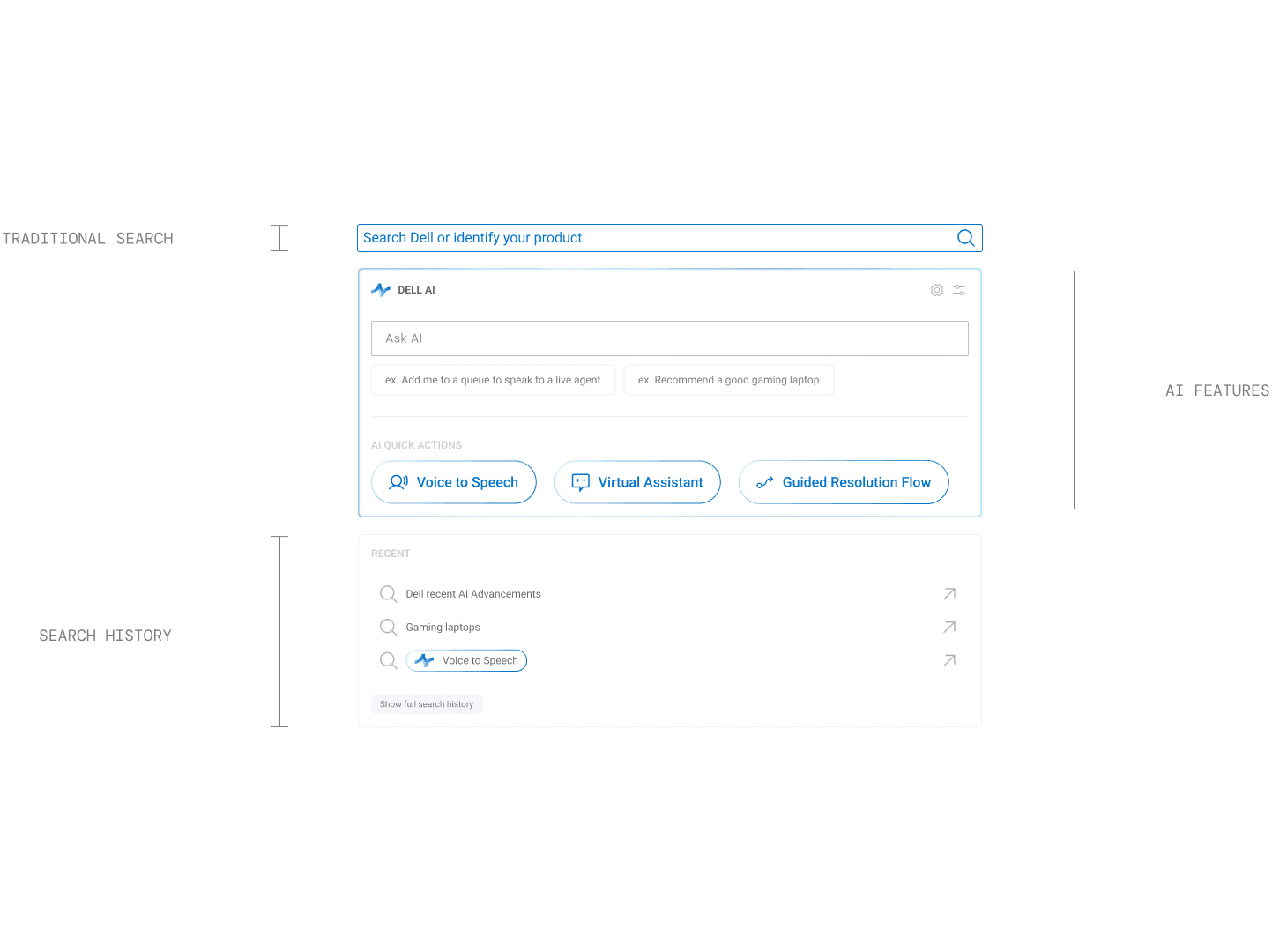
Iteration 01 showing each of the 3 modules attached to the search bar
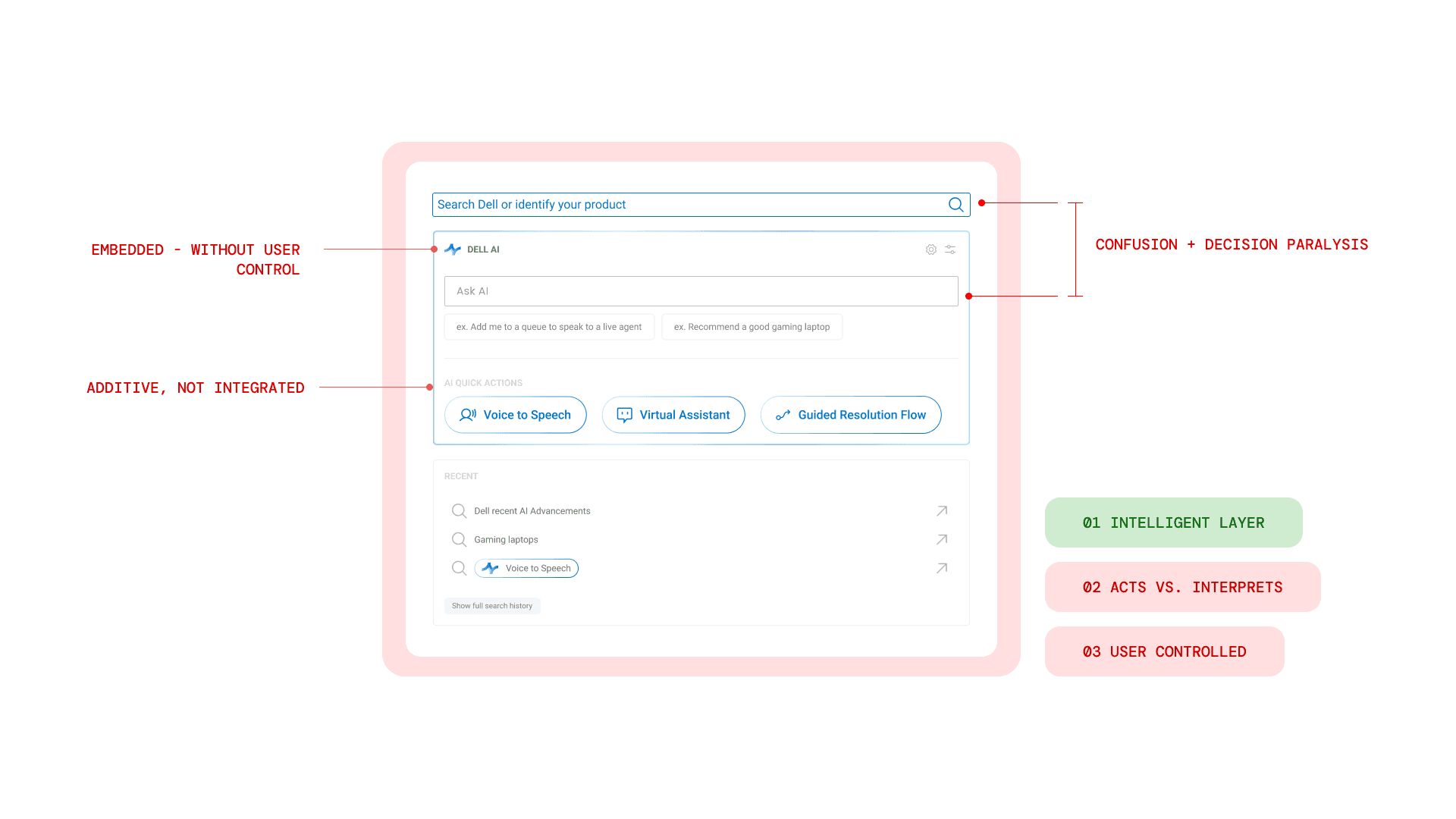
additive, not integrated
Although this direction aligned with our research by introducing an intelligent layer, it ultimately functioned as an add-on rather than a core system. Most importantly, it did not give users meaningful control over how AI assisted them. The interaction model still centered around static search, with AI layered on top.
The accordion embedded AI beneath the search bar, but it did not fundamentally change how users engaged with support. AI remained secondary and reactive — something users had to discover and activate — rather than an integrated part of the resolution flow.
Iteration 02
UI Decisions → UX Impact
Recognizing that AI needed to be embedded into the system rather than layered onto it, we shifted our focus from placement to interaction. This led to our final iteration — a design driven by intentional UI decisions and measurable UX impact — where hierarchy, control, and guidance were fully integrated into the entry experience.
Finalized Home Page
Primary entry point
User Autonomy
Discovery
Action
multiple decision points
one decision

Beyond restructuring the homepage hierarchy, this iteration also expanded how users interact with AI. By introducing visible AI modes and adaptive states embedded directly in the search bar, the system shifts from reactive automation to user-directed assistance. Users retain autonomy through responsive guidance not by making more decisions, but by moving naturally through a system that adapts to them.
ai toggle states
AI Mode
AI Mode
AI Mode
Toggle States
inactive, hover, active
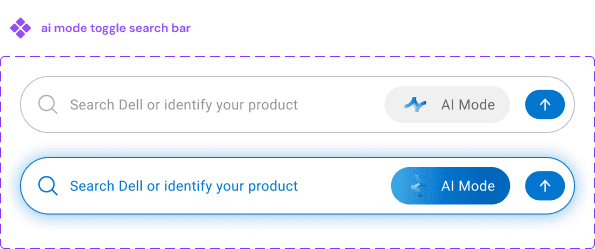
Search Bar
active AI mode is very distinctive
design assets
Introducing Dell AI
By clarifying hierarchy and embedding adaptive AI into the first interaction, the homepage becomes the control layer that powers the next two features.
** Throughout our design iterations, we also wanted to make sure we kept a consistent support journey in mind, and used our design assets (lofi to hifi) by testing scenario 1 from our user interviews**
My Alienware Area-51 gaming laptop won’t connect
search results
Enhanced Search
The first feature we rolled out under Dell AI reimagines the traditional search experience.

Designed primarily for problem-first, more technically confident users, this experience prioritizes speed and clarity while still allowing deeper guidance when needed.

Rather than returning a static list of links, the redesigned search results layer introduces 3 core capabilities:
Quick Answer
Follow up suggestions
Optional actions inline
guided resolution
Step by Step Guidance
While intelligent search supports users who arrive ready to articulate their problem, not everyone begins there.
For users who feel less certain (or who need more clarity before taking action) we introduced a more guided support experience. This second feature provides heavier assistance, breaking issues down step by step and reducing the need for self-diagnosis.
01 Step by step action
The system guides users through structured, sequential actions — diagnosing, testing, and resolving issues in a clear progression to reduce uncertainty and cognitive load.
02 Sources

Ai overview
step by step guide
